


Every Pile, Any Time™ | Stockpile Reports
  • Industry
    • Asphalt
    • Contract Crushing
    • DOTs & Public Works
    • Landscape Materials
    • Ready-Mix
  • About
  • Pricing
  • Resources
    • Help Center
    • Blog
Login
Every Pile, Any Time™ | Stockpile Reports
  • Industry
    • Contract Crushing
    • DOTs & Public Works
    • Landscape Materials
    • Ready-Mix
  • About
  • Pricing
  • Resources
    • Help Center
    • Blog
  • Login
  • Industry
    • Contract Crushing
    • DOTs & Public Works
    • Landscape Materials
    • Ready-Mix
  • About
  • Pricing
  • Resources
    • Help Center
    • Blog
  • Login

SR Measure

4
  • How To Measure a 2-Sided Bunker Pile
  • How to Measure a Freestanding Stockpile
  • How to Measure a Pile Against a Wall
  • How to Measure a 3-Sided Bunker Pile

Self-Service Drone Flights

6
  • Uploading Self-Service Drone Images to Stockpile Reports
  • What Drone and App Should You Use?
  • Viewing Your Self-Service Aerial Report
  • How to Set Up Your Drone for Measuring Inventory
  • Track Your Self-Service Aerial Uploads and Reports
  • Tagging Piles for Measurement (Self-Service Aerials)

Full Service Drone Flights

5
  • How to Schedule a Full-Service Aerial
  • Preparing Your Account for Full-Service Aerials
  • Track Your Full-Service Aerial Flights and Reports
  • Tagging Piles for Measurement (Full-Service Aerials)
  • Viewing Your Full-Service Aerial Reports

Web Portal

4
  • How To Retire a Stockpile
  • How to Manually Verify a Measurement
  • How to View and Verify Stockpile Measurement Reports
  • Camera Status Tool

Admin & Billing

8
  • How to Access Admin Tools
  • How to Fix Product Details
  • How to Manage Your Products
  • How to Update a Conversion Ratio on a Measurement
  • How to Manage Your Sites
  • How to Manage Users
  • How to Manage Your Bunkers
  • How to Clear Your Browser Cache

Troubleshooting

1
  • Contact Support
View Categories
  • Docs
  • Full Service Drone Flights
  • Track Your Full-Service Aerial Flights and Reports

Track Your Full-Service Aerial Flights and Reports

Once you’ve scheduled a Full-Service Aerial flight, here’s what you can expect in terms of pilot communication, scheduling, and tracking progress in the Stockpile Reports portal.


Pilot Communication #

When you schedule a flight, the request is distributed to Stockpile Reports’ network of Part 107 Licensed Pilots.

  • Within 24 hours of accepting the mission, the assigned pilot will contact the site contact listed for the location.
  • At least 24–28 hours before the flight, the pilot will coordinate arrival time and any site check-in procedures.

It is critical that site contacts communicate with pilots. If the pilot leaves a voicemail, the site contact must return the call. This is especially important at sites with unique safety requirements or special procedures.

Tracking Flights in the Aerials Page #

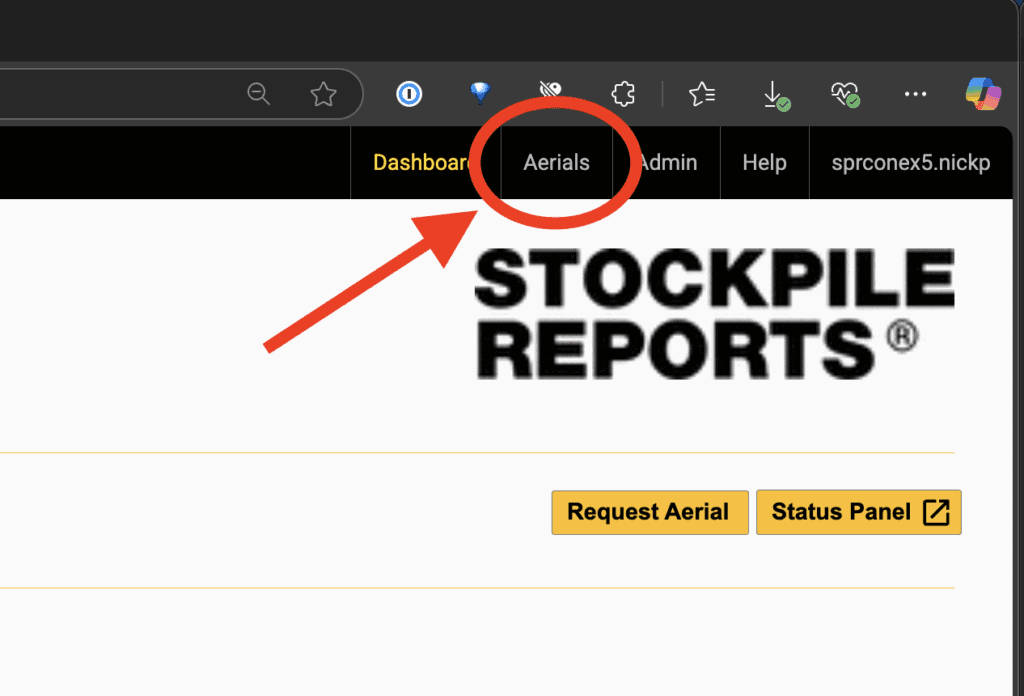
  1. In the web portal, click the Aerials tab (top right corner).
  2. Go to the Full-Service Aerials section.
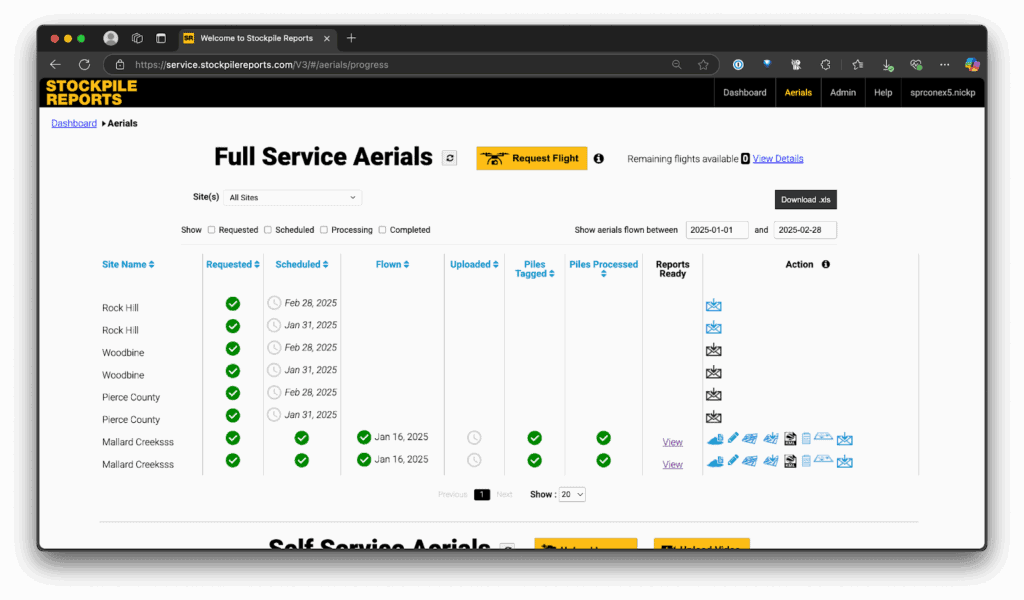
  3. You’ll see all scheduled and completed flights displayed in a progress timeline.
Flight Status Timeline #

You can track progress by following the timeline from left to right. Each stage will display a green check mark when completed:

  • Scheduled – The requested flight date has been confirmed by a pilot.
  • Flown – The flight was completed (may differ from the requested date if rescheduled due to weather or other delays).
  • Uploaded – Stockpile Reports has received the images from the pilot.
  • Piles Tagged – You have tagged piles for measurement (or confirmed existing tags).
  • Piles Processed – Submitted pile tags have been processed into measurement reports.
  • Reports Ready – Reports are available. Click View to open reports.
Updated on October 7, 2025
Business

What are your feelings

Preparing Your Account for Full-Service AerialsTagging Piles for Measurement (Full-Service Aerials)
Table of Contents
  • Pilot Communication
  • Tracking Flights in the Aerials Page
  • Flight Status Timeline
Every Pile, Any Time™ | Stockpile Reports

8201 164th Ave NE, PMB 55

Redmond, WA 98052

Quick Links

About

Pricing

Blog

Contact

(425) 428-5266

Send us a message

  • Follow
  • Follow
  • Follow
  • Follow
  • Follow

© Copyright Stockpile Reports 2025. Privacy Policy.