



Every Pile, Any Time™ | Stockpile Reports
  • Industry
    • Asphalt
    • Contract Crushing
    • DOTs & Public Works
    • Landscape Materials
    • Ready-Mix
  • About
  • Pricing
  • Resources
    • Help Center
    • Blog
Login
Every Pile, Any Time™ | Stockpile Reports
  • Industry
    • Contract Crushing
    • DOTs & Public Works
    • Landscape Materials
    • Ready-Mix
  • About
  • Pricing
  • Resources
    • Help Center
    • Blog
  • Login
  • Industry
    • Contract Crushing
    • DOTs & Public Works
    • Landscape Materials
    • Ready-Mix
  • About
  • Pricing
  • Resources
    • Help Center
    • Blog
  • Login

SR Measure

4
  • How To Measure a 2-Sided Bunker Pile
  • How to Measure a Freestanding Stockpile
  • How to Measure a Pile Against a Wall
  • How to Measure a 3-Sided Bunker Pile

Self-Service Drone Flights

6
  • Uploading Self-Service Drone Images to Stockpile Reports
  • What Drone and App Should You Use?
  • Viewing Your Self-Service Aerial Report
  • How to Set Up Your Drone for Measuring Inventory
  • Track Your Self-Service Aerial Uploads and Reports
  • Tagging Piles for Measurement (Self-Service Aerials)

Full Service Drone Flights

5
  • How to Schedule a Full-Service Aerial
  • Preparing Your Account for Full-Service Aerials
  • Track Your Full-Service Aerial Flights and Reports
  • Tagging Piles for Measurement (Full-Service Aerials)
  • Viewing Your Full-Service Aerial Reports

Web Portal

4
  • How To Retire a Stockpile
  • How to Manually Verify a Measurement
  • How to View and Verify Stockpile Measurement Reports
  • Camera Status Tool

Admin & Billing

8
  • How to Access Admin Tools
  • How to Fix Product Details
  • How to Manage Your Products
  • How to Update a Conversion Ratio on a Measurement
  • How to Manage Your Sites
  • How to Manage Users
  • How to Manage Your Bunkers
  • How to Clear Your Browser Cache

Troubleshooting

1
  • Contact Support
View Categories
  • Docs
  • Full Service Drone Flights
  • How to Schedule a Full-Service Aerial

How to Schedule a Full-Service Aerial

This article explains how to schedule Full-Service Aerial flights and monitor their progress across multiple sites and dates. You can schedule one-time or recurring flights.


Scheduling a Full-Service Aerial #

Flights cannot be scheduled within 7 days of the desired date.

Schedule multiple sites at once only if the request date and frequency are the same.

Flights cannot be scheduled for sites missing boundary or contact info.

  1. Click Request Flight at the top of the screen from the Dashboard or Aerial tab.
  2. Select site(s): Check the box next to the sites you want flown.
  3. Select desired flight date from the calendar.
  4. Set frequency: Choose one-time, weekly, monthly, or quarterly.
    Example: If scheduled on January 28 and set to monthly, the flight will recur on the 28th each month.
  5. Specify number of instances (how many times you want the flight to occur).
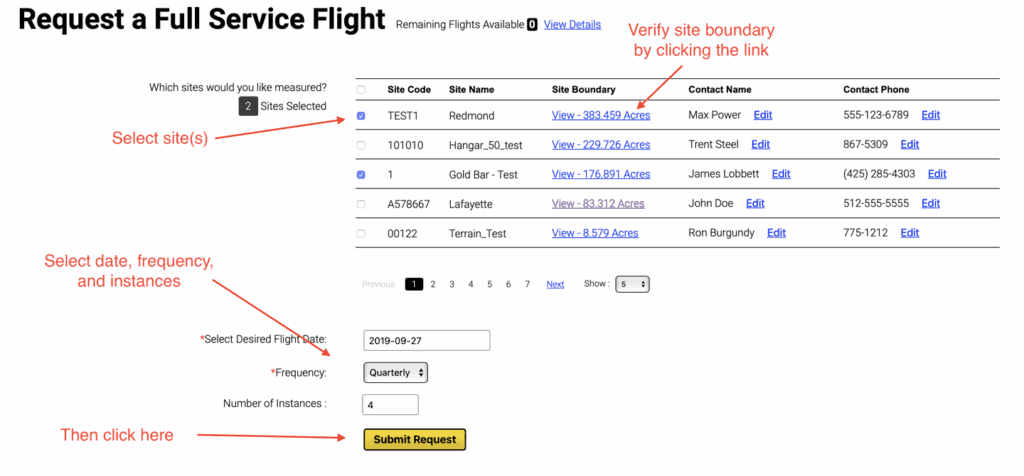
  1. Review site information: Confirm the site boundary and contact info are accurate.
  2. Click Submit Request to send your request to Stockpile Reports.

Checking Flight Status #

  1. Click the Aerial tab at the top of the portal.
  2. In Full-Service Aerials, select the date range and site(s) you want to check.
  3. A green check mark indicates each completed phase. Hover over the check to see the completion date.

Flight Status Definitions #

  • Requested: Flight request received; locating a pilot.
  • Scheduled: Assigned to a pilot.
  • Flown: Flight completed; date recorded.
  • Uploaded: Pilot images uploaded and ready for pile tagging.
  • Piles Tagged: Piles outlined and submitted for processing.
    • If not completed, click “Tag Piles” in the Action column.
  • Piles Processed: Measurements generated.
  • Reports Ready: Reports available.
    • Select View to access reports.
  • Action: Hover to view options: View Piles, View Aerial Image, Download Aerial Image/Notes, or Subscribe to Alerts.
Updated on October 7, 2025
Business

What are your feelings

Preparing Your Account for Full-Service Aerials
Table of Contents
  • Scheduling a Full-Service Aerial
  • Checking Flight Status
    • Flight Status Definitions
Every Pile, Any Time™ | Stockpile Reports

8201 164th Ave NE, PMB 55

Redmond, WA 98052

Quick Links

About

Pricing

Blog

Contact

(425) 428-5266

Send us a message

  • Follow
  • Follow
  • Follow
  • Follow
  • Follow

© Copyright Stockpile Reports 2025. Privacy Policy.