


Every Pile, Any Time™ | Stockpile Reports
  • Industry
    • Asphalt
    • Contract Crushing
    • DOTs & Public Works
    • Landscape Materials
    • Ready-Mix
  • About
  • Pricing
  • Resources
    • Help Center
    • Blog
Login
Every Pile, Any Time™ | Stockpile Reports
  • Industry
    • Contract Crushing
    • DOTs & Public Works
    • Landscape Materials
    • Ready-Mix
  • About
  • Pricing
  • Resources
    • Help Center
    • Blog
  • Login
  • Industry
    • Contract Crushing
    • DOTs & Public Works
    • Landscape Materials
    • Ready-Mix
  • About
  • Pricing
  • Resources
    • Help Center
    • Blog
  • Login

SR Measure

4
  • How To Measure a 2-Sided Bunker Pile
  • How to Measure a Freestanding Stockpile
  • How to Measure a Pile Against a Wall
  • How to Measure a 3-Sided Bunker Pile

Self-Service Drone Flights

6
  • Uploading Self-Service Drone Images to Stockpile Reports
  • What Drone and App Should You Use?
  • Viewing Your Self-Service Aerial Report
  • How to Set Up Your Drone for Measuring Inventory
  • Track Your Self-Service Aerial Uploads and Reports
  • Tagging Piles for Measurement (Self-Service Aerials)

Full Service Drone Flights

5
  • How to Schedule a Full-Service Aerial
  • Preparing Your Account for Full-Service Aerials
  • Track Your Full-Service Aerial Flights and Reports
  • Tagging Piles for Measurement (Full-Service Aerials)
  • Viewing Your Full-Service Aerial Reports

Web Portal

4
  • How To Retire a Stockpile
  • How to Manually Verify a Measurement
  • How to View and Verify Stockpile Measurement Reports
  • Camera Status Tool

Admin & Billing

8
  • How to Access Admin Tools
  • How to Fix Product Details
  • How to Manage Your Products
  • How to Update a Conversion Ratio on a Measurement
  • How to Manage Your Sites
  • How to Manage Users
  • How to Manage Your Bunkers
  • How to Clear Your Browser Cache

Troubleshooting

1
  • Contact Support
View Categories
  • Docs
  • Admin & Billing
  • How to Manage Your Bunkers

How to Manage Your Bunkers

Add bunker profiles through the iPhone app or Admin portal. Edit the bunker profile through the Admin portal.


Video Tutorial: Adding a Bunker in SR Measure #

Video Tutorial: Adding a Bunker in the Web Dashboard #


Add a Bunker Profile #

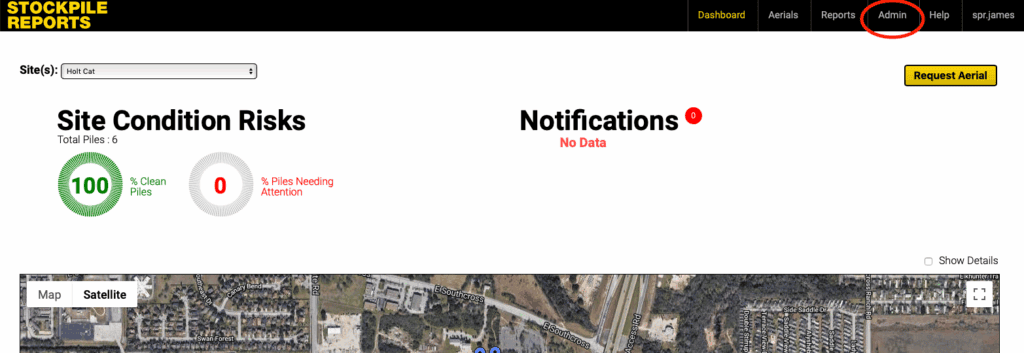
  1. Click on the Admin tab.
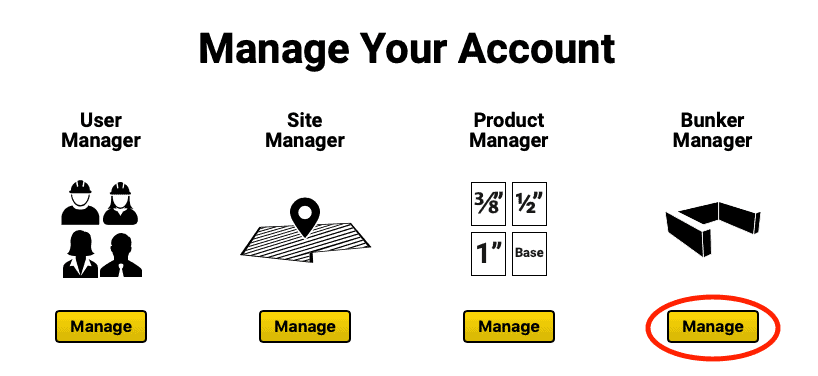
  1. Click the Manage button under the Bunker Manager icon.
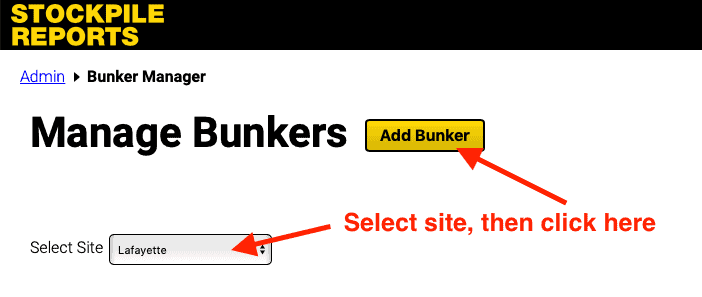
  1. Select the site for the new bunker and click the Add Bunker button to bring up the new bunker profile form.
  1. Fill out the new bunker profile form following the guidelines below.
    • Location: Select the site at which the bunker is located.
    • Position the Bunker Pin: Move the red pin over the location of the bunker on the map.
    • Bunker Identifier/Name: Name the bunker profile to identify in the app and on the measurement report.
    • Notes: Any specific notes about the bunker.
    • Is the Bunker Indoor? Select Yes if the bunker is inside a building or semi-enclosed with an overhead roof or awning.
    • Bunker Structure Type: Choose one, two, or three sided bunker. Bunkers may not have more than three sides.
    • Bunker Measurements: The internal length, width, and height of each wall as depicted in inches or centimeters (inches for users in the US, centimeters for users outside the US).
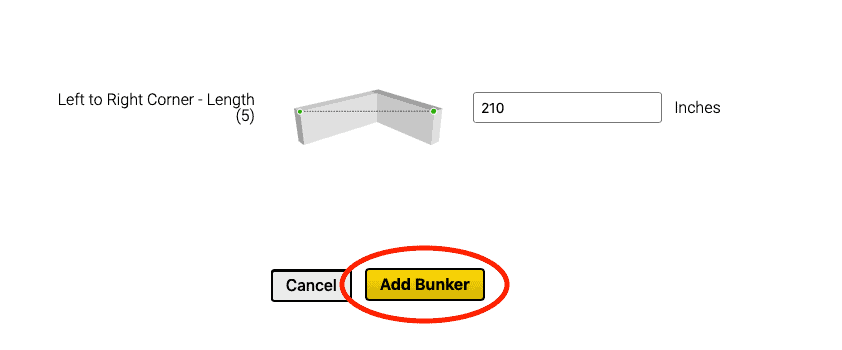
  2. After completing the Bunker Profile, click the Add Bunker button at the bottom of the page to add the bunker to the site’s bunker list.
Edit Bunker Profile #

  1. From the Web Dashboard, click Admin → Manage under Bunker Manager.
  2. Find your bunker in the list and click Edit.
  3. Move the pin, update the name, number of sides, and dimensions as needed.
  4. Click the Update button at the bottom of the page to save the changes.

Delete a Bunker Profile #

  1. From the Web Dashboard, click Admin → Manage under Bunker Manager.
  2. Find your bunker in the list and click Edit.
  3. Scroll down to the bottom of the edit form and click the Delete button to delete the bunker profile, then click Yes, delete! to confirm.
Updated on October 7, 2025
Business

What are your feelings

How to Manage UsersHow to Clear Your Browser Cache
Table of Contents
  • Video Tutorial: Adding a Bunker in SR Measure
  • Video Tutorial: Adding a Bunker in the Web Dashboard
  • Add a Bunker Profile
  • Edit Bunker Profile
  • Delete a Bunker Profile
Every Pile, Any Time™ | Stockpile Reports

8201 164th Ave NE, PMB 55

Redmond, WA 98052

Quick Links

About

Pricing

Blog

Contact

(425) 428-5266

Send us a message

  • Follow
  • Follow
  • Follow
  • Follow
  • Follow

© Copyright Stockpile Reports 2025. Privacy Policy.